
INTERNOLD NETWORKS CCNA LIVE WEBCLASS (INCLW)
Analyzing Subnet Masks
Analyzing Subnet Masks
The subnet mask used in one or many subnets in an IP internetwork says a lot about the intent of the subnet design. First, the mask divides addresses into two parts: prefix and host, with the host part defining the size of the subnet. Then, the class (A, B, or C) further divides the structure of addresses in a subnet, breaking the prefix part into the network and subnet parts. The subnet part defines the number of subnets that could exist inside one classful IP network, assuming that one mask is used throughout the classful network.
The subnet mask holds the key to understanding several important subnetting design points. However, to analyze a subnet mask, you first need some basic math skills with masks. The math converts masks between the three different formats used to represent a mask:
- Binary
- Dotted-decimal notation (DDN)
- Prefix (also called classless interdomain routing [CIDR])
This lesson has two major sections. The first focuses totally on the mask formats and the math used to convert between the three formats. The second section explains how to take an IP address and its subnet mask and analyze those values. In particular, it shows how to determine the three-part format of the IPv4 address and describes the facts about the subnetting design that are implied by the mask.
Subnet Mask Conversion
This section describes how to convert between different formats for the subnet mask. You can then use these processes when you practice. If you already know how to convert from one format to the other, go ahead and move to the section “Practice Converting Subnet Masks,” later in this lesson.
Three Mask Formats
Subnet masks can be written as 32-bit binary numbers, but not just any binary number. In particular, the binary subnet mask must follow these rules:
- The value must not interleave 1s and 0s.
- If 1s exist, they are on the left.
- If 0s exist, they are on the right.
For example, the following values would be illegal. The first is illegal because the value interleaves 0s and 1s, and the second is illegal because it lists 0s on the left and 1s on the right:
10101010 01010101 11110000 00001111
00000000 00000000 00000000 11111111
The following two binary values meet the requirements, in that they have all 1s on the left, followed by all 0s, with no interleaving of 1s and 0s:
11111111 00000000 00000000 00000000
11111111 11111111 11111111 00000000
Two alternative subnet mask formats exist so that we humans do not have to work with 32-bit binary numbers. One format, dotted-decimal notation (DDN), converts each set of 8 bits into the decimal equivalent. For example, the two previous binary masks would convert to the following DDN subnet masks, because binary 11111111 converts to decimal 255, and binary 00000000 converts to decimal 0:
255.0.0.0
255.255.255.0
Although the DDN format has been around since the beginning of IPv4 addressing, the third mask format was added later, in the early 1990s: the prefix format. This format takes advantage of the rule that the subnet mask starts with some number of 1s, and then the rest of the digits are 0s. Prefix format lists a slash (/) followed by the number of binary 1s in the binary mask. Using the same two examples as earlier in this section, the prefix format equivalent masks are as follows:
/8
/24
Note that although the terms prefix or prefix mask can be used, the terms CIDR mask or slash mask can also be used. This newer prefix style mask was created around the same time as the classless interdomain routing (CIDR) specification back in the early 1990s, and the acronym CIDR grew to be used for anything related to CIDR, including prefix-style masks. In addition, the term slash mask is sometimes used because the value includes a slash mark (/).
You need to get comfortable working with masks in different formats. The rest of this section examines how to convert between the three formats.
Converting Between Binary and Prefix Masks
Converting between binary and prefix masks should be relatively intuitive after you know that the prefix value is simply the number of binary 1s in the binary mask. For the sake of completeness, the processes to convert in each direction are
Binary to prefix: Count the number of binary 1s in the binary mask, and write the total, in decimal, after a /.
Prefix to binary: Write P binary 1s, where P is the prefix value, followed by as many binary 0s as required to create a 32-bit number.
Tables 2 and 3 show some examples.

Table 2 Example Conversions: Binary to Prefix

Converting Between Binary and DDN Masks
By definition, a dotted-decimal number (DDN) used with IPv4 addressing contains four decimal numbers, separated by dots. Each decimal number represents 8 bits. So, a single DDN shows four decimal numbers that together represent some 32-bit binary number.
Conversion from a DDN mask to the binary equivalent is relatively simple to describe, but can be laborious to perform. First, to do the conversion, the process is as follows:
For each octet, perform a decimal-to-binary conversion.
However, depending on your comfort level with doing decimal-to-binary conversions, that process can be difficult or time-consuming. If you want to think about masks in binary for the exam, consider picking one of the following methods to do the conversion and practicing until you can do it quickly and accurately:
Do the decimal-binary conversions, but practice your decimal-binary conversions to get fast. If you choose this path, consider the Cisco Binary Game, which you can find by searching its name at the Cisco Learning Network (CLN) (http://learningnetwork.cisco.com).
Use the decimal-binary conversion chart in Numeric Reference Tables. This lets you find the answer more quickly now, but you cannot use the chart on exam day.
Memorize the nine possible decimal values that can be in a decimal mask, and practice using a reference table with those values.
The third method, which is the method recommended in this course, takes advantage of the fact that any and every DDN mask octet must be one of only nine values. Why? Well, remember how a binary mask cannot interleave 1s and 0s, and the 0s must be on the right? It turns out that only nine different 8-bit binary numbers conform to these rules. Table 4 lists the values, along with other relevant information.
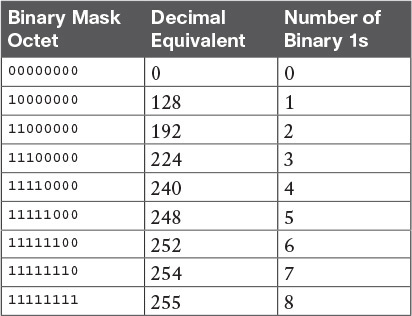
Table 4: Nine Possible Values in One Octet of a Subnet Mask
Many subnetting processes can be done with or without binary math. Some of those processes—mask conversion included—use the information in Table 4. You should plan to memorize the information in the table. I recommend making a copy of the table to keep handy while you practice. (You will likely memorize the contents of this table simply by practicing the conversion process enough to get both good and fast at the conversion.)
Using the table, the conversion processes in each direction with binary and decimal masks are as follows:
Binary to decimal: Organize the bits into four sets of eight. For each octet, find the binary value in the table and write down the corresponding decimal value.
Decimal to binary: For each octet, find the decimal value in the table and write down the corresponding 8-bit binary value.
Tables 5 and 6 show some examples

Table 5: Conversion Example: Binary to Decimal

Converting Between Prefix and DDN Masks
When learning, the best way to convert between the prefix and decimal formats is to first convert to binary. For example, to move from decimal to prefix, first convert decimal to binary and then from binary to prefix.
For the exams, set a goal to master these conversions doing the math in your head. While learning, you will likely want to use paper. To train yourself to do all this without writing it down, instead of writing each octet of binary, just write the number of binary 1s in that octet.
Figure 1 shows an example with a prefix-to-decimal conversion. The left side shows the conversion to binary as an interim step. For comparison, the right side shows the binary interim step in shorthand that just lists the number of binary 1s in each octet of the binary mask.

Figure 1: Conversion from Prefix to Decimal: Full Binary Versus Shorthand
Similarly, when converting from decimal to prefix, mentally convert to binary along the way, and as you improve, just think of the binary as the number of 1s in each octet. Figure 2 shows an example of such a conversion.

Practice Converting Subnet Masks
Before moving to the second half of this lesson, and thinking about what these subnet masks mean, first do some practice. Practice the processes discussed in this lesson until you get the right answer most of the time. Later, before taking the exam, practice more until you master the topics in this lesson and can move pretty fast, as outlined in the right column of Table 7.

Table 8 lists eight practice problems. The table has three columns, one for each mask format. Each row lists one mask, in one format. Your job is to find the mask’s value in the other two formats for each row.

Identifying Subnet Design Choices Using Masks
Subnet masks have many purposes. In fact, if ten experienced network engineers were independently asked, “What is the purpose of a subnet mask?” the engineers would likely give a variety of true answers. The subnet mask plays several roles.
This lesson focuses on one particular use of a subnet mask: defining the prefix part of the IP addresses in a subnet. The prefix part must be the same value for all addresses in a subnet. In fact, a single subnet can be defined as all IPv4 addresses that have the same value in the prefix part of their IPv4 addresses.
While the previous paragraph might sound a bit formal, the idea is relatively basic, as shown in Figure 3. The figure shows a network diagram, focusing on two subnets: a subnet of all addresses that begin with 172.16.2 and another subnet made of all addresses that begin with 172.16.3. In this example, the prefix—the part that has the same value in all the addresses in the subnet—is the first three octets.

Figure 3: Simple Subnet Design, with Mask /24
While people can sit around a conference table and talk about how a prefix is three octets long, computers communicate that same concept using a subnet mask. In this case, the subnets use a subnet mask of /24, which means that the prefix part of the addresses is 24 bits (3 octets) long.
This section explains more about how to use a subnet mask to understand this concept of a prefix part of an IPv4 address, along with these other uses for a subnet mask. Note that this section discusses the first five items in the list.
- Defines the size of the prefix (combined network and subnet) part of the addresses in a subnet
- Defines the size of the host part of the addresses in the subnet
- Can be used to calculate the number of hosts in the subnet
- Provides a means for the network designer to communicate the design details—the number of subnet and host bits—to the devices in the network
- Under certain assumptions, can be used to calculate the number of subnets in the entire classful network
- Can be used in binary calculations of both the subnet ID and the subnet broadcast address
Masks Divide the Subnet’s Addresses into Two Parts
The subnet mask subdivides the IP addresses in a subnet into two parts: the prefix, or subnet part, and the host part.
The prefix part identifies the addresses that reside in the same subnet, because all IP addresses in the same subnet have the same value in the prefix part of their addresses. The idea is much like the postal code (ZIP codes in the United States) in mailing addresses. All mailing addresses in the same town have the same postal code. Likewise, all IP addresses in the same subnet have identical values in the prefix part of their addresses.
The host part of an address identifies the host uniquely inside the subnet. If you compare any two IP addresses in the same subnet, their host parts will differ, even though the prefix parts of their addresses have the same value. To summarize these key comparisons:
- Prefix (subnet) part: Equal in all addresses in the same subnet.
- Host part: Different in all addresses in the same subnet.
For example, imagine a subnet that, in concept, includes all addresses whose first three octets are 10.1.1. So, the following list shows several addresses in this subnet:
- 10.1.1.1
- 10.1.1.2
- 10.1.1.3
In this list, the prefix or subnet part (the first three octets of 10.1.1) are equal. The host part (the last octet [in bold]) is different. So, the prefix or subnet part of the address identifies the group, and the host part identifies the specific member of the group.
The subnet mask defines the dividing line between the prefix and the host part. To do so, the mask creates a conceptual line between the binary 1s in the binary mask and the binary 0s in the mask. In short, if a mask has P binary 1s, the prefix part is P bits long and the rest of the bits are host bits. Figure 4 shows the general concept.

Figure 4: Prefix (Subnet) and Host Parts Defined by Masks 1s and 0s
The next figure, Figure 5, shows a specific example using mask 255.255.255.0. Mask 255.255.255.0 (/24) has 24 binary 1s, for a prefix length of 24 bits.

Masks and Class Divide Addresses into Three Parts
In addition to the two-part view of IPv4 addresses, you can also think about IPv4 addresses as having three parts. To do so, just apply Class A, B, and C rules to the address format to define the network part at the beginning of the address. This added logic divides the prefix into two parts: the network part and the subnet part. The class defines the length of the network part, with the subnet part simply being the rest of the prefix. Figure 6 shows the idea.

The combined network and subnet parts act like the prefix because all addresses in the same subnet must have identical values in the network and subnet parts. The size of the host part remains unchanged, whether viewing the addresses as having two parts or three parts.
To be complete, Figure 7 shows the same example as in the previous section, with the subnet of “all addresses that begin with 10.1.1.” In that example, the subnet uses mask 255.255.255.0, and the addresses are all in Class A network 10.0.0.0. The class defines 8 network bits, and the mask defines 24 prefix bits, meaning that 24 – 8 = 16 subnet bits exist. The host part remains as 8 bits per the mask.

Classless and Classful Addressing
The terms classless addressing and classful addressing refer to the two different ways to think about IPv4 addresses as described so far in this lesson. Classful addressing means that you think about Class A, B, and C rules, so the prefix is separated into the network and subnet parts, as shown in Figures 6 and 7. Classless addressing means that you ignore the Class A, B, and C rules and treat the prefix part as one part, as shown in Figures 4 and 5. The following more formal definitions are listed for reference and study:
- Classless addressing: The concept that an IPv4 address has two parts—the prefix part plus the host part—as defined by the mask, with no consideration of the class (A, B, or C).
- Classful addressing: The concept that an IPv4 address has three parts—network, subnet, and host—as defined by the mask and Class A, B, and C rules
NOTE: Unfortunately, the networking world uses the terms classless and classful in a couple of different ways. In addition to the classless and classful addressing described here, each routing protocol can be categorized as either a classless routing protocol or a classful routing protocol. In addition, the terms classless routing and classful routing refer to some details of how Cisco routers forward (route) packets using the default route in some cases. As a result, these terms can be easily confused and misused. So, when you see the words classless and classful, be careful to note the context: addressing, routing, or routing protocols.
Calculations Based on the IPv4 Address Format
After you know how to break an address down using both classless and classful addressing rules, you can easily calculate a couple of important facts using some basic math formulas.
First, for any subnet, after you know the number of host bits, you can calculate the number of host IP addresses in the subnet. Next, if you know the number of subnet bits (using classful addressing concepts) and you know that only one subnet mask is used throughout the network, you can also calculate the number of subnets in the network. The formulas just require that you know the powers of 2:
Hosts in the subnet: 2H – 2, where H is the number of host bits.
Subnets in the network: 2s, where S is the number of subnet bits. Only use this formula if only one mask is used throughout the network.
The sizes of the parts of IPv4 addresses can also be calculated. The math is basic, but the concepts are important. Keeping in mind that IPv4 addresses are 32 bits long, the two parts with classless addressing must add up to 32 (P + H = 32), and with classful addressing, the three parts must add up to 32 (N + S + H = 32). Figure 8 shows the relationships.

Figure 8: Relationship Between /P, N, S, and H
You often begin with an IP address and mask, both when answering questions on the CCNA Routing and Switching exams and when examining problems that occur in real networks. Based on the information in this lesson and earlier lessons, you should be able to find all the information in Figure 8 and then calculate the number of hosts/subnet and the number of subnets in the network. For reference, the following process spells out the steps:
- Step 1. Convert the mask to prefix format (/P) as needed. (See the earlier section “Practice Converting Subnet Masks” for review.)
- Step 2. Determine N based on the class.
- Step 3. Calculate S = P – N.
- Step 4. Calculate H = 32 – P.
- Step 5. Calculate hosts/subnet: 2H – 2.
- Step 6. Calculate number of subnet: 2s.
For example, consider the case of IP address 8.1.4.5 with mask 255.255.0.0. Following the process:
- Step 1. 255.255.0.0 = /16, so P=16.
- Step 2. 8.1.4.5 is in the range 1–126 in the first octet, so it is Class A; so N=8.
- Step 3. S = P – N = 16 – 8 = 8.
- Step 4. H = 32 – P = 32 – 16 = 16.
- Step 5. 216 – 2 = 65,534 hosts/subnet.
- Step 6. 28 = 256 subnets.
Figure 9 shows a visual analysis of the same problem.

Figure 9 Visual Representation of Problem: 8.1.4.5, 255.255.0.0
For another example, consider address 200.1.1.1, mask 255.255.255.252. Following the process:
- Step 1. 255.255.255.252 = /30, so P=30.
- Step 2. 200.1.1.1 is in the range 192–223 in the first octet, so it is Class C; so N=24.
- Step 3. S = P – N = 30 – 24 = 6.
- Step 4. H = 32 – P = 32 – 30 = 2.
- Step 5. 22 – 2 = 2 hosts/subnet
- Step 6. 26 = 64 subnets.
This example uses a popular mask for serial links, because serial links only require two host addresses, and the mask supports only two host addresses.
Practice Analyzing Subnet Masks
As with the other subnetting math in this course, using a two-phase approach may help. Take time now to practice until you feel like you understand the process. Then, before the exam, make sure you master the math. Table 9 summarizes the key concepts and suggestions for this two-phase approach.

Table 9 Keep-Reading and Take-Exam Goals for This Lesson’s Topics
On a piece of scratch paper, answer the following questions. In each case:
- Determine the structure of the addresses in each subnet based on the class and mask, using classful IP addressing concepts. In other words, find the size of the network, subnet, and host parts of the addresses.
- Calculate the number of hosts in the subnet.
- Calculate the number of subnets in the network, assuming that the same mask is used throughout.
- 8.1.4.5, 255.255.254.0
- 130.4.102.1, 255.255.255.0
- 199.1.1.100, 255.255.255.0
- 130.4.102.1, 255.255.252.0
- 199.1.1.100, 255.255.255.224
